
Bypassing JA4 TLS Fingerprinting in Python with curl_cffi and tls-client
Copying Chrome’s User-Agent and sec-ch-ua headers into Python requests or httpx does not make the TCP socket behave like Chrome. Before the server parses a single HTTP header, it reads the unencrypted TLS ClientHello message and computes a JA4 fingerprint from your TLS library’s cipher suites, extensions, and ALPN advertisement. Because standard Python HTTP libraries wrap OpenSSL instead of BoringSSL, WAFs spot the mismatch immediately.
In this tutorial, we decode how JA4 works, benchmark requests, httpx, curl_cffi, and tls-client against real Chrome 158 using https://tls.peet.ws/api/all, and walk through working Python configurations that match Chrome’s TLS and HTTP/2 stack without subtle header leaks.
Decoding a JA4 fingerprint
Every TLS connection starts with a plaintext ClientHello frame listing protocol versions, cipher suites, extensions, and signature algorithms. The FoxIO JA4 specification turns that handshake into a 36-character string with three underscore-separated parts (a_b_c).
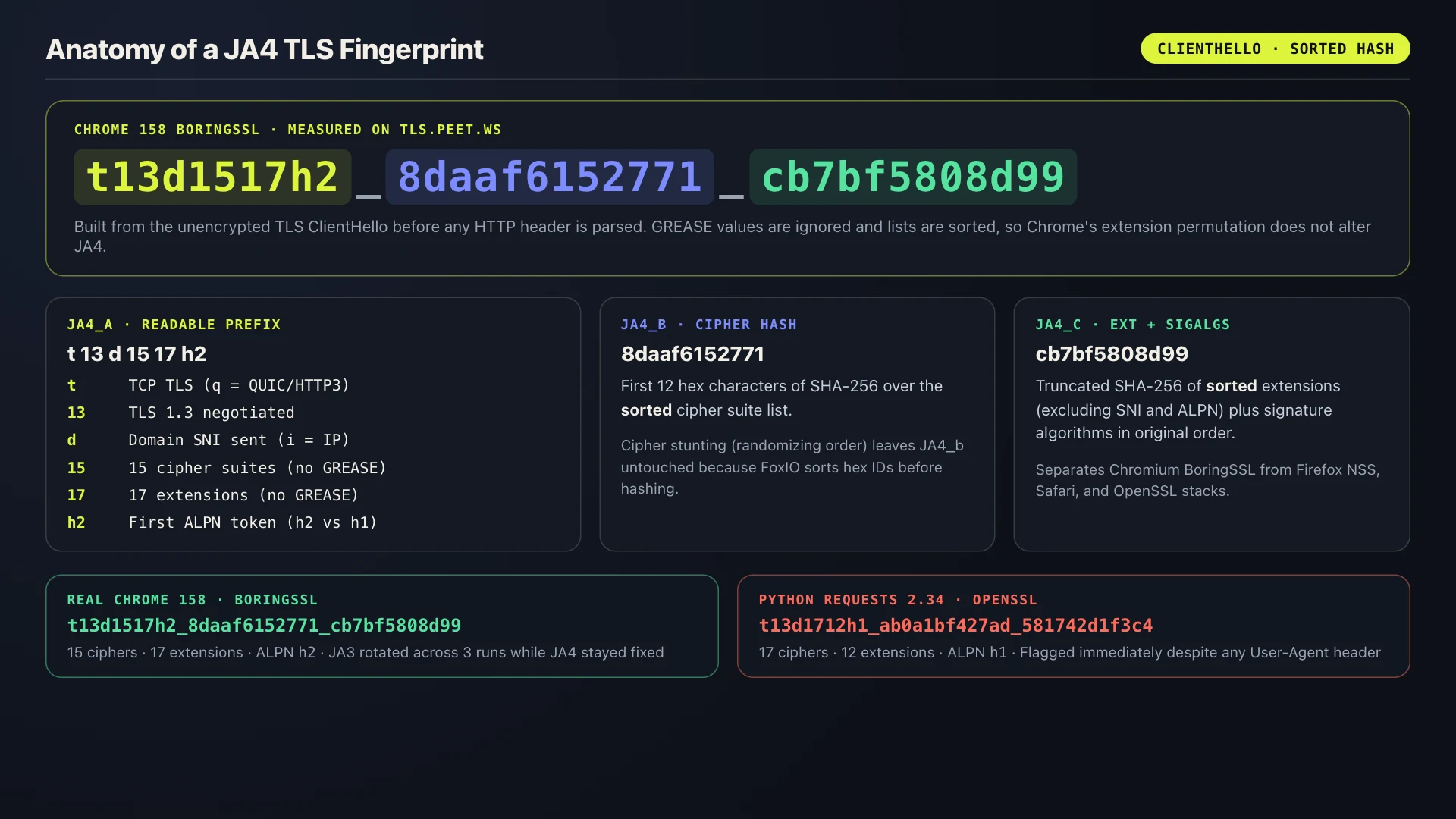
In our capture against tls.peet.ws, headless Chrome 158.0.8127.89 emitted:
t13d1517h2_8daaf6152771_cb7bf5808d99The first block (t13d1517h2) is readable without any lookup table:
| Slice | Value | Meaning |
|---|---|---|
t |
Transport | TLS over TCP (q indicates QUIC / HTTP/3; d indicates DTLS) |
13 |
TLS version | TLS 1.3 negotiated |
d |
SNI flag | Domain name present in SNI (i means raw IP or missing SNI) |
15 |
Cipher count | 15 cipher suites offered (GREASE placeholders excluded) |
17 |
Extension count | 17 TLS extensions offered (GREASE excluded) |
h2 |
ALPN | First and last characters of the primary ALPN protocol (h2 vs h1) |
The remaining two blocks are truncated 12-character SHA-256 digests:
8daaf6152771(JA4_b): Hash of the cipher suites sorted in hexadecimal order.cb7bf5808d99(JA4_c): Hash of the sorted TLS extensions (omitting SNI0x0000and ALPN0x0010) concatenated with signature algorithms kept in original order.
When debugging blocked scrapers, the prefix alone reveals mismatches fast. If your client shows 1712h1 instead of 1517h2, the edge network already knows the client is not Chrome.
Why JA4 catches scripts that bypassed JA3
Older JA3 hashes concatenated TLS ciphers and extensions in wire order. Once Chromium shipped TLS extension permutation in Chrome 110 (early 2023), a single real browser emitted a different ja3_hash on nearly every handshake. In our own three consecutive launches of Chrome 158 on macOS, ja3_hash rotated every time (f67731049e8d, cbc34cbfd9b7, 9c671720b420), while ja4 stayed locked at t13d1517h2_8daaf6152771_cb7bf5808d99.
Because JA4 sorts ciphers and extensions before hashing, extension permutation and cipher-order randomization no longer alter the fingerprint. Major edge providers enforce it natively: Cloudflare exposes ja4 and aggregated behavioral scores in firewall rules and Workers, and AWS WAF supports JA4 matching and rate-based aggregation across CloudFront distributions and Application Load Balancers.
Benchmarking Python HTTP clients against Chrome 158
Install the four Python HTTP clients to test them from your own machine:
python3 -m venv .venv
source .venv/bin/activate
pip install requests "httpx[http2]" curl_cffi tls-client
Save this benchmark script as ja4_benchmark.py and run it against https://tls.peet.ws/api/all:
import tls_client
import httpx
import requests
from curl_cffi import requests as cffi

ECHO_URL = "https://tls.peet.ws/api/all"


def summarize(label: str, data: dict) -> str:
    tls = data["tls"]
    h2 = data.get("http2") or {}
    h2_hash = (h2.get("akamai_fingerprint_hash") or "-")[:12]
    return (
        f"{label:<26} {data['http_version']:<9} "
        f"{tls['ja4']:<37} ja3={tls['ja3_hash'][:12]} h2={h2_hash}"
    )


if __name__ == "__main__":
    print(summarize("requests", requests.get(ECHO_URL, timeout=20).json()))
    print(summarize("httpx (h1)", httpx.get(ECHO_URL, timeout=20).json()))

    with httpx.Client(http2=True, timeout=20) as client:
        print(summarize("httpx (http2=True)", client.get(ECHO_URL).json()))

    for profile in ("chrome", "chrome152_macos", "firefox155", "safari260"):
        resp = cffi.get(ECHO_URL, impersonate=profile, timeout=20).json()
        print(summarize(f"curl_cffi {profile}", resp))

    tls_sess = tls_client.Session(
        client_identifier="chrome_152",
        random_tls_extension_order=True,
    )
    tls_sess.headers.update({
        "user-agent": (
            "Mozilla/5.0 (Windows NT 10.0; Win64; x64) AppleWebKit/537.36 "
            "(KHTML, like Gecko) Chrome/152.0.0.0 Safari/537.36"
        ),
        "accept": "application/json,text/html;q=0.9,*/*;q=0.8",
        "accept-language": "en-US,en;q=0.9",
    })
    print(summarize("tls-client chrome_152", tls_sess.get(ECHO_URL, timeout_seconds=20).json()))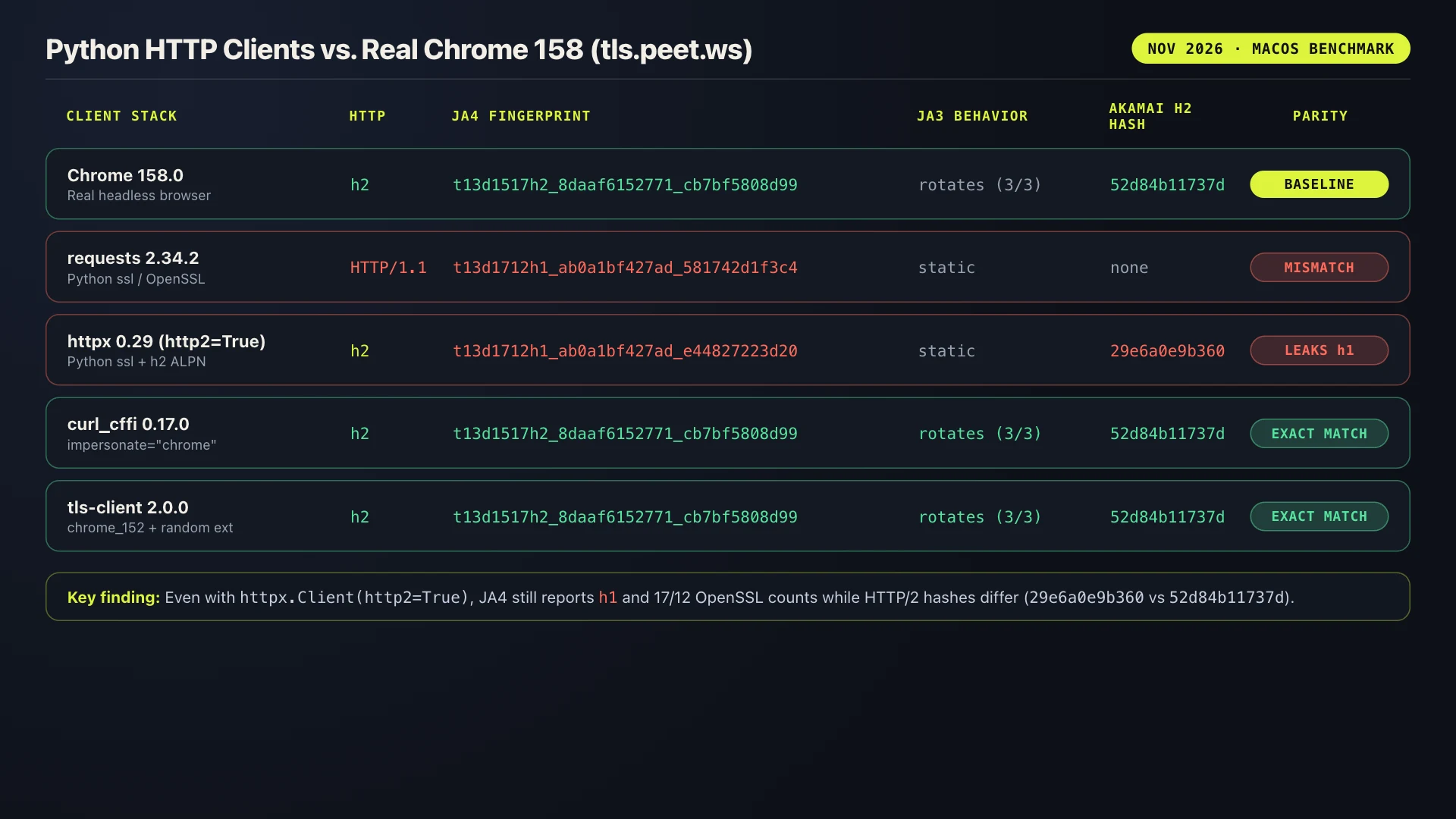
Running this in November 2026 on macOS (Python 3.15.2, requests 2.34.2, httpx 0.29.0, curl_cffi 0.17.0, tls-client 2.0.0) produced these measurements:
| Client and profile | HTTP | tls.ja4 |
tls.ja3_hash (prefix) |
Akamai H2 hash (prefix) |
|---|---|---|---|---|
Chrome 158.0.8127.89 (real browser) |
h2 |
t13d1517h2_8daaf6152771_cb7bf5808d99 |
Rotates (f67731049e8d, cbc34cbfd9b7, 9c671720b420) |
52d84b11737d |
requests 2.34.2 |
HTTP/1.1 |
t13d1712h1_ab0a1bf427ad_581742d1f3c4 |
48bdbfeea1fc (static) |
none |
httpx 0.29.0 (default) |
HTTP/1.1 |
t13d1712h1_ab0a1bf427ad_e44827223d20 |
72d7d4e38c1a (static) |
none |
httpx 0.29.0 (http2=True) |
h2 |
t13d1712h1_ab0a1bf427ad_e44827223d20 |
72d7d4e38c1a (static) |
29e6a0e9b360 |
curl_cffi chrome / chrome152_macos |
h2 |
t13d1517h2_8daaf6152771_cb7bf5808d99 |
Rotates (1ac3d4a9aac0, de0da3269b68, 59a67d46c8bd) |
52d84b11737d |
curl_cffi firefox155 |
h2 |
t13d1517h2_8daaf6152771_3cbfd9057e0d |
424f6d9c8b89 |
6ea73faa8fc5 |
curl_cffi safari260 |
h2 |
t13d2014h2_a09f3c656075_d0a99439f9b1 |
6618231821d2 |
c52879e43202 |
tls-client chrome_152 (random ext) |
h2 |
t13d1517h2_8daaf6152771_cb7bf5808d99 |
Rotates (15a508d912e4, 54e1042bca1b, e19cf07bf8c7) |
52d84b11737d |
Look closely at httpx (http2=True). Even though HTTP/2 framing negotiated h2 (with an OpenSSL/httpcore fingerprint of 1:4096;2:0;4:65535;5:16384;3:100;6:65536|16777216|0|m,a,s,p), the JA4 prefix still stayed t13d1712h1. Because httpx keeps http/1.1 ahead of h2 in its ALPN list and relies on OpenSSL ciphers, both its TLS handshake and HTTP/2 SETTINGS differ from Chrome’s BoringSSL profile.
Matching Chrome’s JA4 fingerprint with curl_cffi
curl_cffi binds curl-impersonate (libcurl compiled with BoringSSL and NSS patches) into Python. You get two ways to pick a browser identity:
- Rolling alias (
impersonate="chrome"): Maps to the newest Chrome target bundled in your installedcurl_cffirelease (in0.17.0, that points tochrome152on Windows). Upgradingcurl_cffiautomatically moves your fingerprint forward. - Pinned profile (
impersonate="chrome152"or"chrome152_macos"): Locks the TLS handshake, HTTP/2 settings, andUser-Agentto a known target so builds remain reproducible across runs.
Avoid trying to build a Chrome JA4 from scratch with curl_cffi’s low-level ja3= and extra_fp= arguments. Because JA4_b and JA4_c are one-way SHA-256 hashes covering signature algorithms and extensions that ja3= omits, hand-rolled parameters routinely fall short of Chrome’s 17 extensions. Stick to a built-in impersonate= profile and run a startup preflight check so library upgrades never drift silently:
from curl_cffi import requests

PROFILE = "chrome152"
EXPECTED_JA4 = "t13d1517h2_8daaf6152771_cb7bf5808d99"
ECHO_URL = "https://tls.peet.ws/api/all"


def verify_profile(session: requests.Session) -> None:
    ja4 = session.get(ECHO_URL, timeout=20).json()["tls"]["ja4"]
    if ja4 != EXPECTED_JA4:
        raise RuntimeError(f"JA4 mismatch for {PROFILE}: got {ja4}")


with requests.Session(impersonate=PROFILE) as session:
    verify_profile(session)
    resp = session.get("https://httpbin.org/headers", timeout=20)
    print(resp.status_code, resp.json()["headers"]["User-Agent"])
For concurrent scraping jobs, reuse one AsyncSession rather than opening a fresh session per request. Reusing the session preserves HTTP/2 multiplexing, TLS session resumption, and consistent headers across every worker:
import asyncio
from curl_cffi import requests

URLS = [
    "https://httpbin.org/anything/page-1",
    "https://httpbin.org/anything/page-2",
    "https://httpbin.org/anything/page-3",
]


async def scrape_all():
    sem = asyncio.Semaphore(3)
    async with requests.AsyncSession(impersonate="chrome152") as session:
        async def fetch(url: str):
            async with sem:
                res = await session.get(url, timeout=20)
                return url, res.status_code, len(res.text)

        for row in await asyncio.gather(*(fetch(u) for u in URLS)):
            print(row)


asyncio.run(scrape_all())
One bonus when targets serve HTTP/3: curl_cffi also supports QUIC via http_version="v3". We verified requests.get("https://cloudflare-quic.com/", impersonate="chrome152", http_version="v3") returned HTTP 200 over HTTP/3 on the same run.
Using Go’s uTLS from Python with tls-client
uTLS is a Go fork of crypto/tls that emits exact browser ClientHello frames. There is no native Python binding for uTLS directly, so Python scrapers call it through tls-client, which compiles bogdanfinn’s Go uTLS HTTP client into a platform shared library wrapped via ctypes.
In our live test of tls-client 2.0.0, two defaults broke realism when left untouched:
- Missing browser headers: With no explicit
headerspassed,tls-clientsent Chrome’s exact JA4 (t13d1517h2_8daaf6152771_cb7bf5808d99), yet identified itself withUser-Agent: tls-client/2.0.0and only three headers (accept,accept-encoding,user-agent). Any WAF comparing JA4 againstUser-Agentcatches that immediately. - Disabled extension shuffling: With
random_tls_extension_order=False, consecutive requests emitted the identicalja3_hash(2d25c56381929cc91bc97631a0a46f58on every run), unlike modern Chrome. Settingrandom_tls_extension_order=Truerestored realistic per-connection JA3 rotation (15a508d912e4,54e1042bca1b,e19cf07bf8c7).
Here is the corrected configuration:
import tls_client

session = tls_client.Session(
    client_identifier="chrome_152",
    random_tls_extension_order=True,
)
session.headers.update({
    "user-agent": (
        "Mozilla/5.0 (Windows NT 10.0; Win64; x64) AppleWebKit/537.36 "
        "(KHTML, like Gecko) Chrome/152.0.0.0 Safari/537.36"
    ),
    "accept": "text/html,application/xhtml+xml,application/xml;q=0.9,*/*;q=0.8",
    "accept-language": "en-US,en;q=0.9",
})

fp = session.get("https://tls.peet.ws/api/all", timeout_seconds=20).json()
print("JA4:", fp["tls"]["ja4"])
print("H2:", fp["http2"]["akamai_fingerprint_hash"])
print("UA:", fp["user_agent"])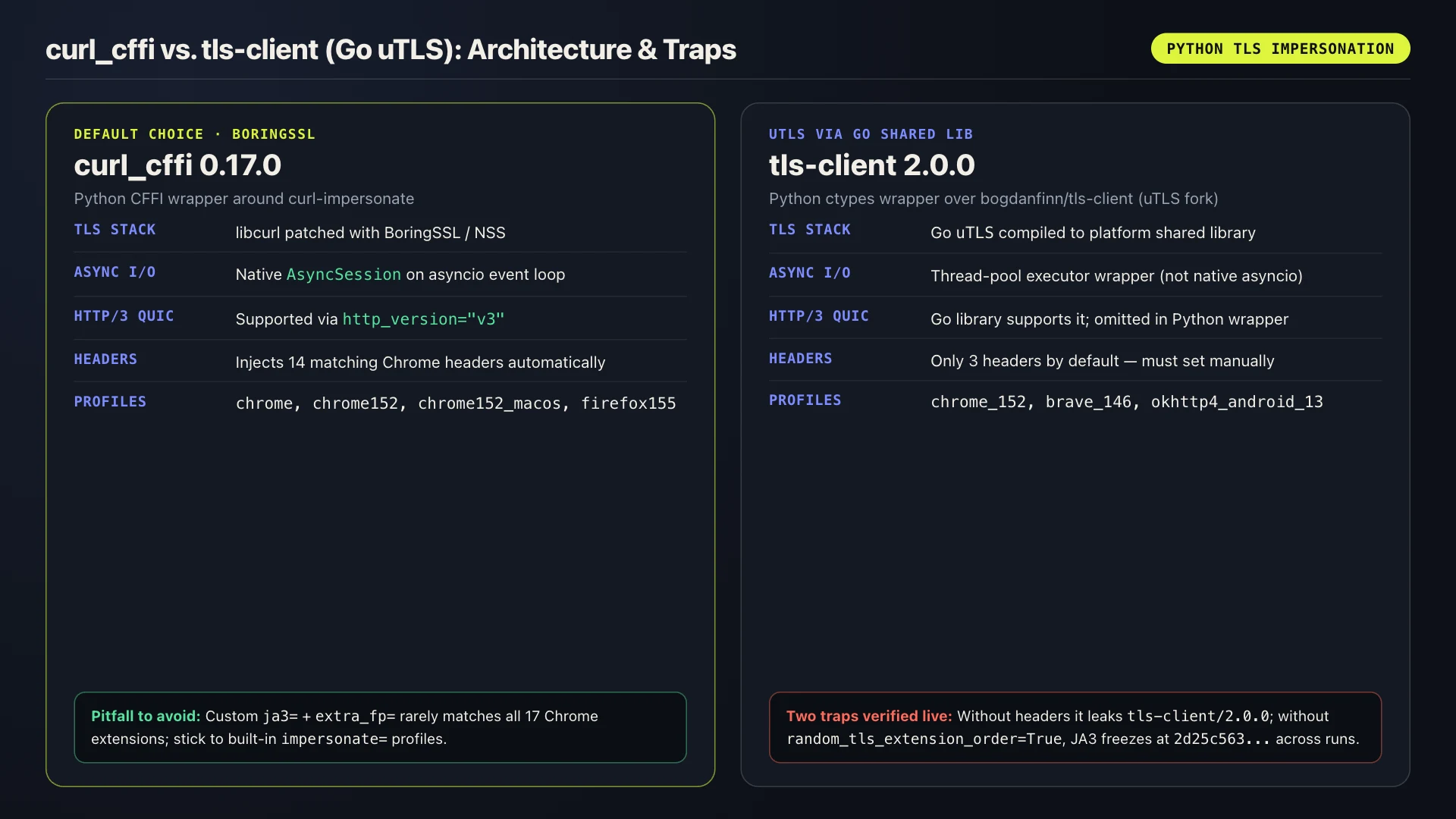
| Feature | curl_cffi 0.17.0 |
tls-client 2.0.0 |
|---|---|---|
| Underlying TLS stack | curl-impersonate (BoringSSL / NSS) |
Go uTLS fork compiled to shared lib |
| Async architecture | Native asyncio (AsyncSession) |
Worker-thread wrapper around Go CFFI calls |
| Default browser headers | Injects 14 matching Chrome headers automatically | Sends only 3 headers (tls-client/2.0.0 UA) |
| HTTP/3 support | Yes (http_version="v3") |
Not exposed in the Python wrapper |
| Extension shuffling | Built into Chrome targets | Must pass random_tls_extension_order=True |
For most Python scraping workloads, curl_cffi is the cleaner default because native asyncio avoids thread-pool overhead and its default headers stay aligned with the chosen TLS profile. Pick tls-client when you specifically need Go uTLS parity with an existing Go service or an identifier that only its profile list provides (such as okhttp4_android_13).
What anti-bot systems check beyond JA4
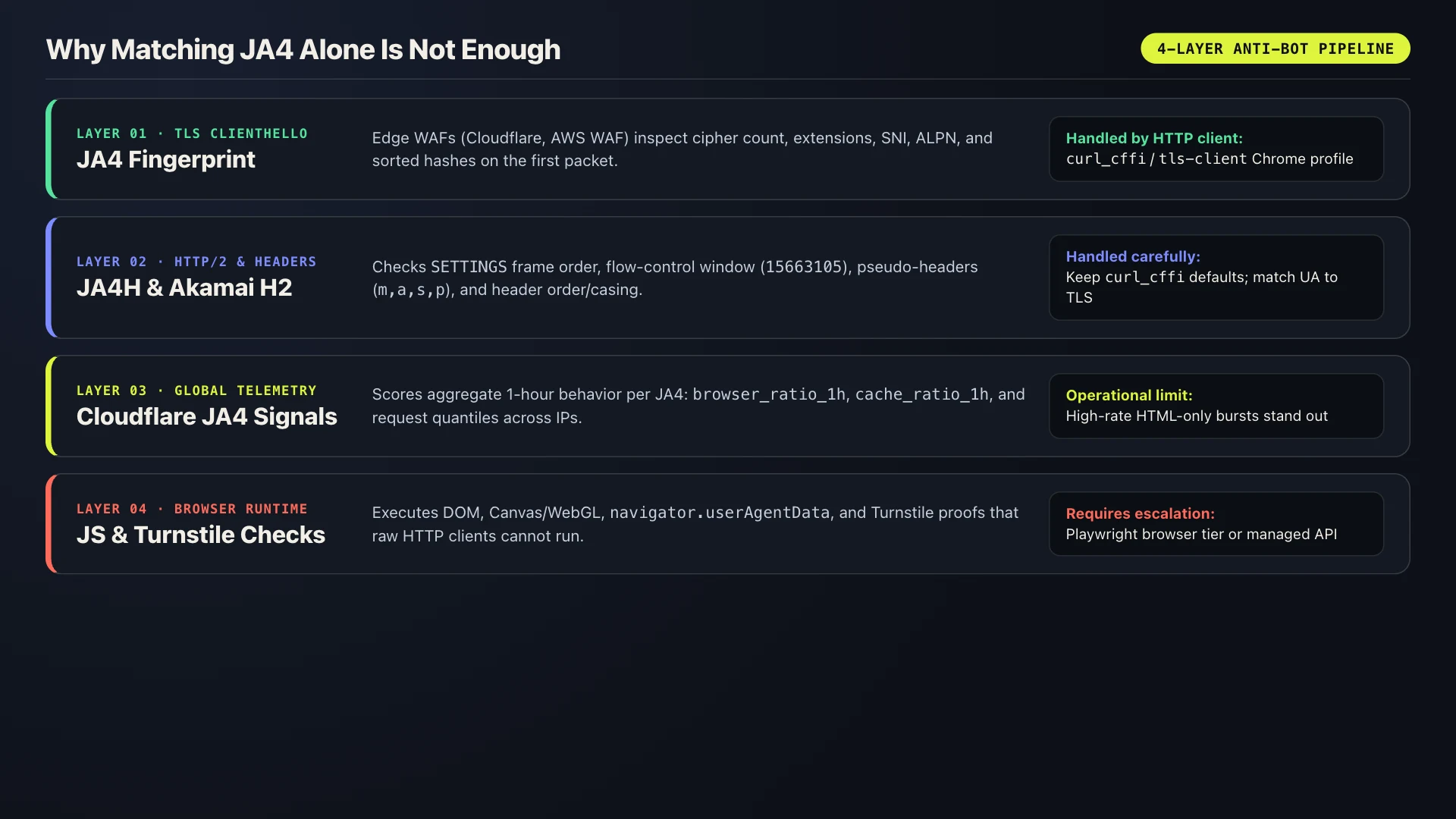
Matching Chrome’s JA4 eliminates TLS-layer rejection, yet four adjacent signals still expose automated scripts:
- HTTP/2 &
JA4Hparity: Servers verify Akamai HTTP/2 settings (1:65536;2:0;4:6291456;6:262144|15663105|0|m,a,s,pfor Chrome), header casing, and header ordering (sec-ch-uaheaders beforeuser-agent). Overridingcurl_cffi’s default headers carelessly can re-introduce mismatches. - Global behavioral ratios: Cloudflare computes network-wide 1-hour aggregates per JA4 under JA4 Signals, including
browser_ratio_1h(fraction of requests using browser User-Agents) andcache_ratio_1h(fraction of cacheable static assets requested). Rapid HTML-only scraping from a single datacenter ASN looks anomalous even with a genuine Chrome JA4. - Profile rotation and browser updates: FoxIO notes that JA4 fingerprints typically shift about once a year when underlying TLS libraries change, while
User-Agentmajor versions move much faster. Rotate only across a small pool of current desktop profiles (chrome152,chrome152_macos,firefox155) instead of cycling outdated browser strings, and run your JA4 check in CI whenever upgrading dependencies. - JavaScript & DOM challenges: Neither
curl_cffinortls-clientexecutes JavaScript. When a target serves Turnstile, Canvas/WebGL probes, ornavigator.userAgentDatachecks, escalate to a full Chromium runtime and audit cross-layer parity using our browser fingerprint consistency guide.
Skipping TLS and browser upkeep on social platforms
Maintaining TLS impersonation profiles, residential proxy pools, and headless browser fallbacks makes sense for custom targets. On heavily defended social platforms like TikTok or X, however, TLS parity is only the first hurdle before signed tokens, request pacing, and residential IP checks kick in.
When your goal is clean structured data rather than maintaining scraper infrastructure, managed actors handle the request stack for you:
- Ultimate TikTok Scraper extracts profiles, hashtags, keywords, transcripts, comments, and watermark-free video URLs from a single JSON schema.
- Advanced Search TikTok API filters keyword search results by region, publish window, and sort order with Standby API support.
- Advanced X.com Twitter API pulls tweets, search timelines, lists, and reply threads without official X API keys.
All three run on Apify, which includes free monthly credits so you can benchmark managed extraction against your own scraper maintenance cost before scaling up.
References
- FoxIO-LLC/ja4: JA4+ Network Fingerprinting Specification
- FoxIO Technical Details: JA4 TLS Client Fingerprinting (
JA4.md) - Cloudflare Blog: Advancing Threat Intelligence: JA4 fingerprints and inter-request signals
- AWS WAF Developer Guide: JA4 Fingerprint Rule Statements
- lexiforest/curl_cffi: Python bindings for curl-impersonate
- bogdanfinn/tls-client and refraction-networking/utls